Custom workflows
Encode the way your team actually works, including its approvals, exceptions and handoffs.
From the first lead to the final destage.
DataSpeaks builds custom home-staging platforms that connect CRM, design, inventory, warehouses, projects, scheduling and finance — around the way your business actually works.
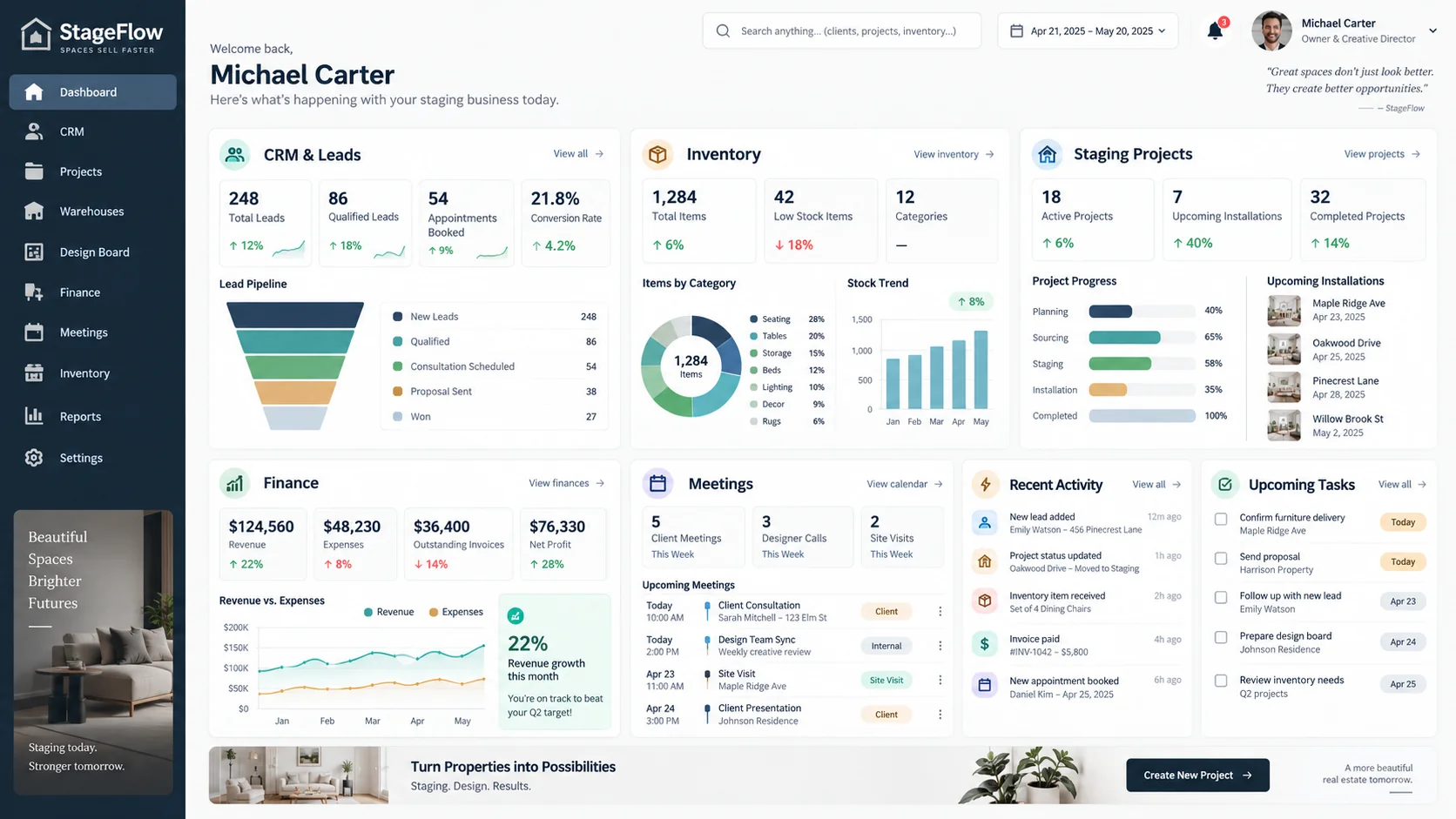
Representative custom staging platform experience
Swipe to explore →
The staging lifecycle
A staging business is not just inventory software or project management. Every step affects the next. We build the system that connects them.
Move an inquiry toward a signed staging engagement.
Turn the approved scope into a practical staging plan.
Coordinate furniture, crews, installation and the live stage.
Complete the commercial cycle and improve the next one.
One handoff completes. The next team already has the context.
CRM → Design → Inventory → Delivery → Finance
See leads, inventory, warehouse activity, active projects, upcoming installations, meetings and financial signals from one place.
Before drilling into the details, know exactly where the business stands.
Command center
Representative24 open
Lead pipeline
18
Active projects
5 this week
Installations
$124.5K
Revenue MTD
Maple Ridge consultation
New lead follow-up
Oakwood installation
Crew of 4 dispatched
Vendor invoice review
Finance
3
overdue invoices
82% of invoices collected on time
Representative interface with illustrative data — not an actual product screenshot.
Your business shouldn't require six spreadsheets and four browser tabs just to answer one question.
Now drill into the inventory powering those projects.
Know what you own, what is available, what is reserved and what is already committed to another project.
Inventory control
Representative842
Available
126
Reserved
98
Allocated
34
In Transit
154
Staged
18
Returning
12
Maintenance
6
Unavailable
Maple Ridge installation
18 items outbound
Oakwood destage
24 items returning
Dining chairs
6 items to maintenance
42
low-availability items
68% average utilization
Representative interface with illustrative data — not an actual product screenshot.
Inventory only becomes useful when you know exactly where every item lives.
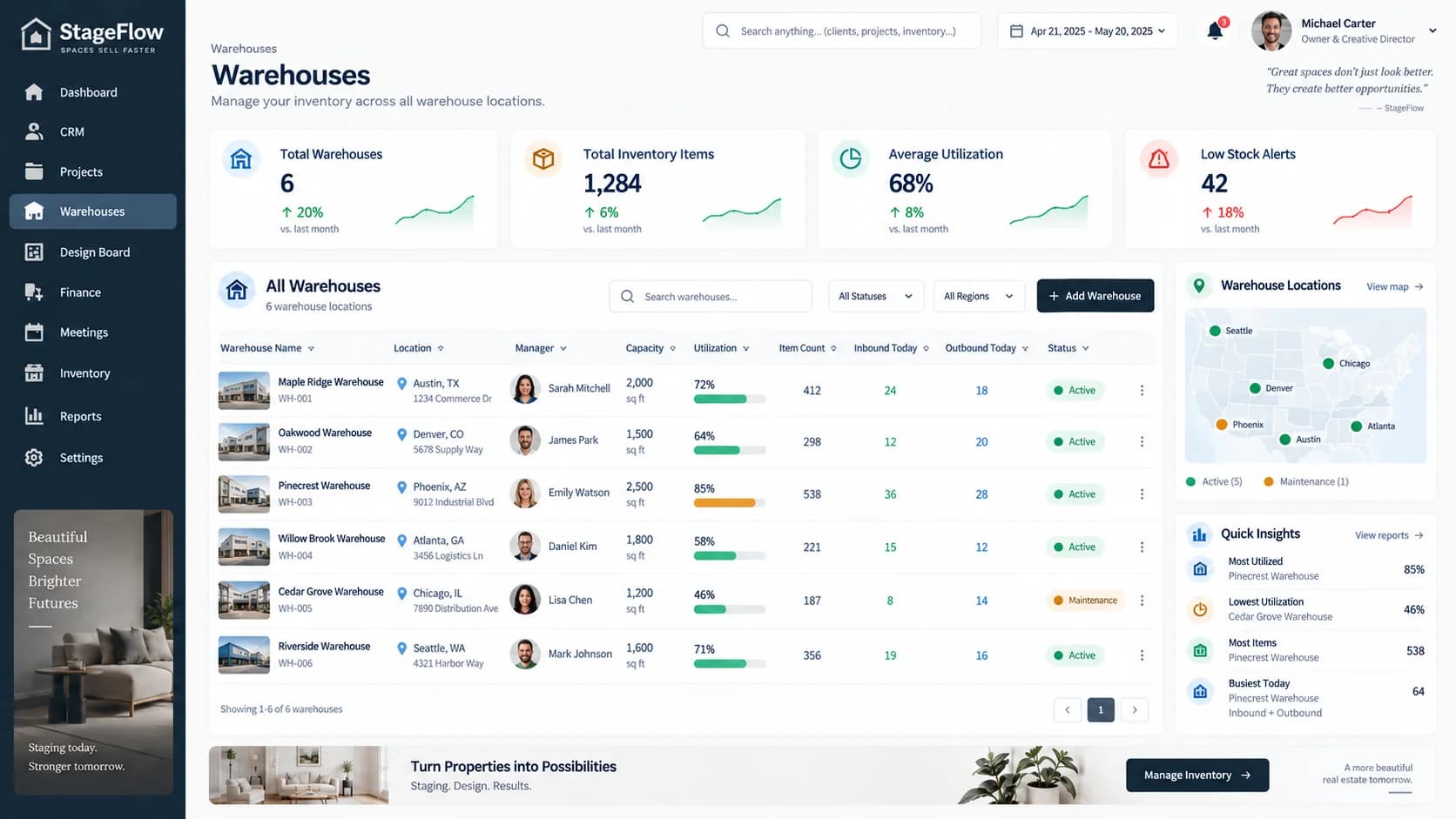
Inventory becomes far more useful when your team knows exactly which warehouse holds it, how much capacity remains and where items are moving next.
Inventory answers
What do we own?
Warehouse answers
Where is it?
While operations manage inventory, every future staging project begins with an opportunity.
Capture the lead, schedule the consultation, send the proposal and know exactly what needs to happen next.
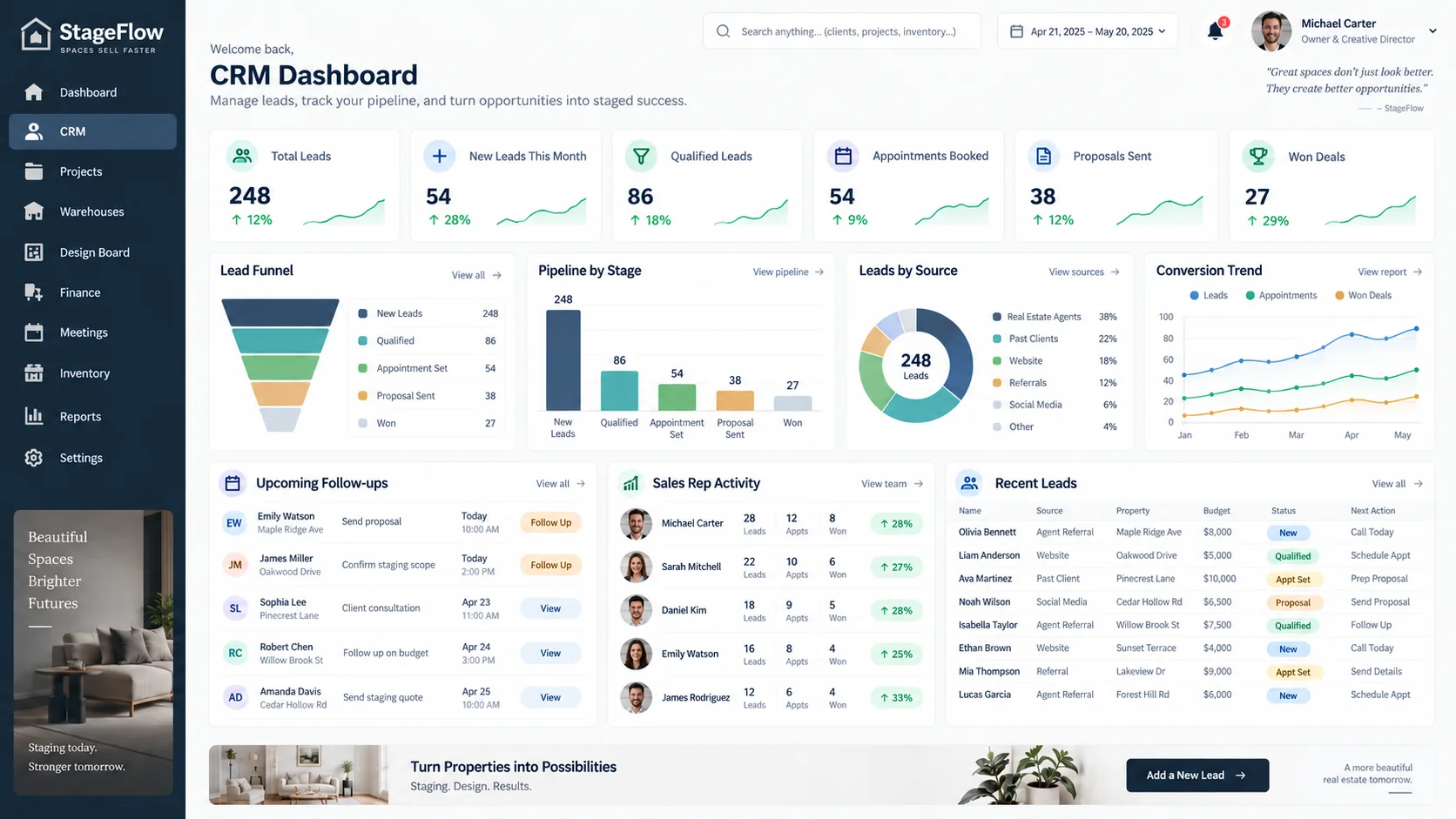
CRM is how homeowner, realtor and referral opportunities enter the staging operating system.
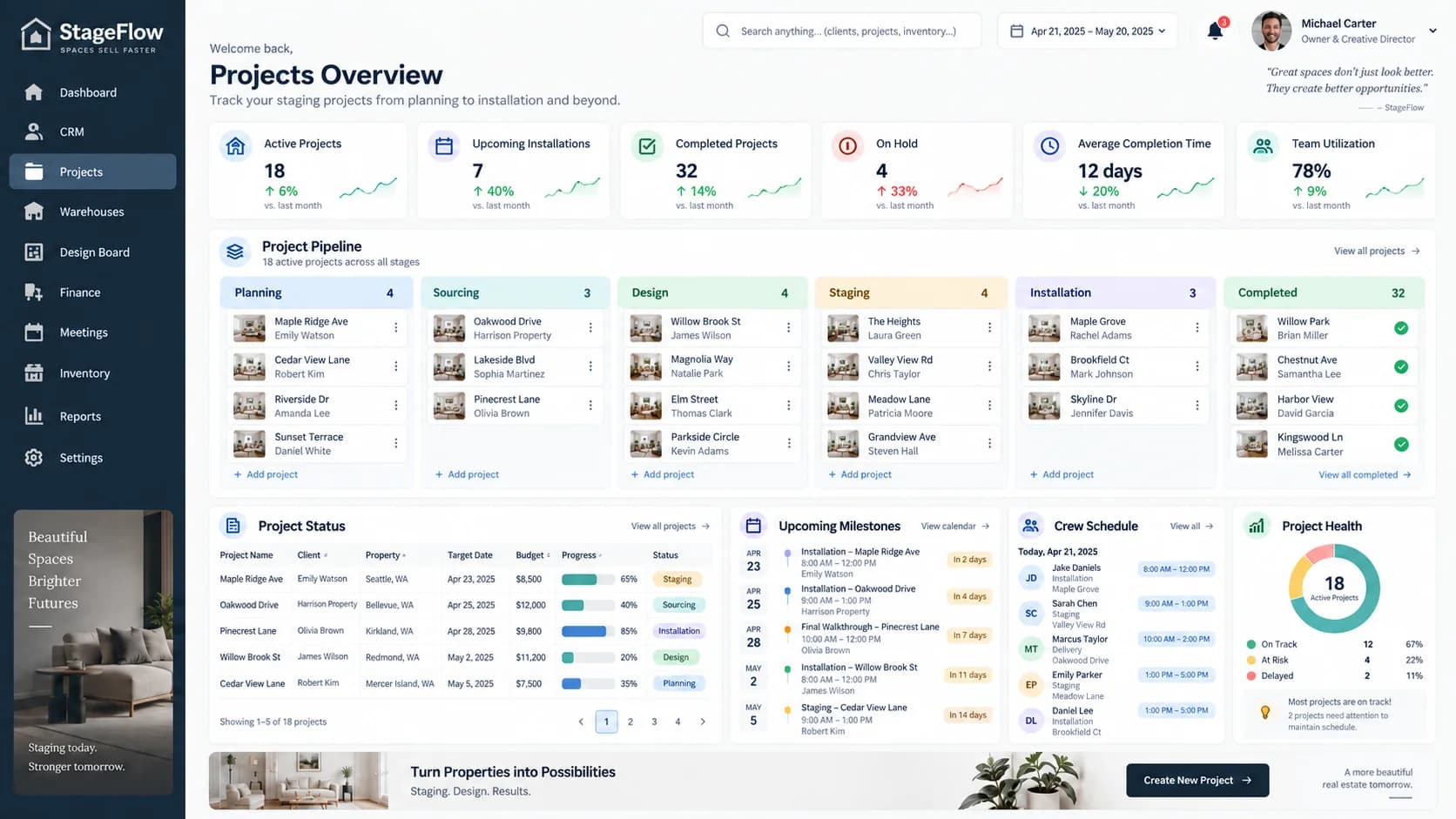
When the proposal is won, the opportunity becomes a project.
A won opportunity becomes a project. Furniture is allocated, the warehouse prepares it, the team installs it, and the project follows every item through destage and return.
Before furniture reaches the property, the staging vision begins on the design board.
Bring design decisions, furniture selections, inventory availability and project execution into the same workflow.
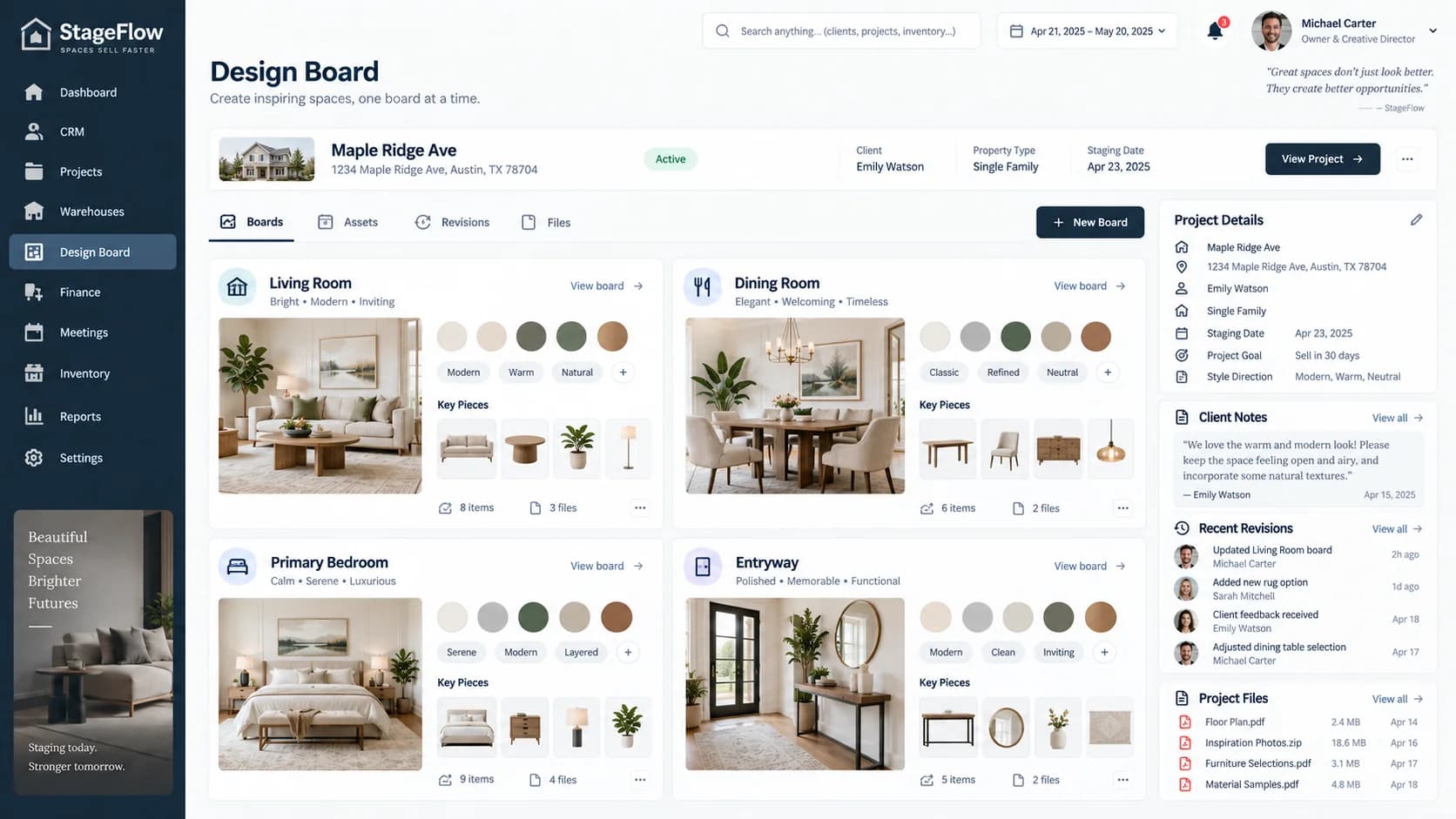
A beautiful moodboard becomes much more useful when every selected piece can connect to real inventory, pricing and the project schedule.
Behind every room is a connected chain of people, inventory, projects and decisions.
The connected platform
When every team works from the same system, a change in one place can be reflected everywhere else.
01
Summarizes everything
02
Creates the project
03
Coordinates the work
04
Selects the pieces
05
Tracks availability
06
Moves every item
Shared operational data
A won proposal creates the project.
A designer's selection checks availability.
A reservation updates warehouse availability.
An installation updates the project timeline.
A destage return restores available inventory.
The dashboard reflects the result of it all.
Custom, by design
Off-the-shelf staging platforms solve common industry workflows. But when your operation has its own warehouse logic, pricing rules, approvals, integrations, reporting requirements or customer experience, the software itself needs to adapt.
Typical off-the-shelf staging software
Custom platform built by DataSpeaks
Built around your business
From warehouse floor to client property, the platform can support each role without breaking the shared workflow.
Encode the way your team actually works, including its approvals, exceptions and handoffs.
Connect accounting, payments, calendars, messaging, storage and existing tools.
Model reservations, transfers, utilization and availability around physical locations.
Give owners, sales, designers, warehouse staff, crews, finance and clients the right view.
Reduce repetitive calculations, handoffs, reminders and status updates.
Build reports around the questions leadership actually asks.
Support teams working from warehouses, customer properties, installations and destaging jobs.
Build for today's operation without limiting tomorrow's growth.
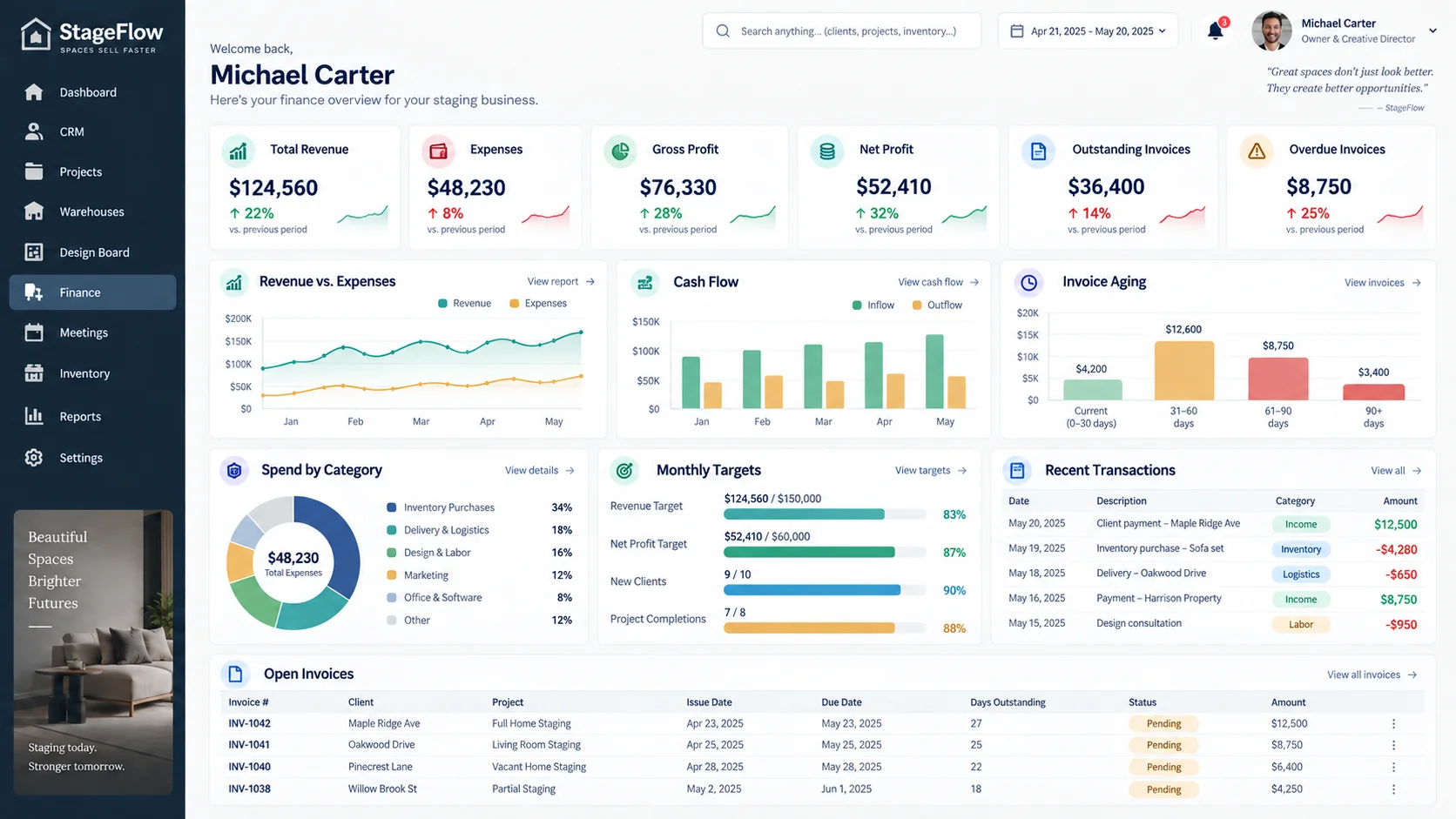
The broader platform can support revenue, expenses, project profitability, invoices, aging, transaction history, cash flow and financial reporting—without interrupting the core product journey.
Engineering depth
The business workflow comes first. Then we apply the right product, integration, data and cloud engineering to make it dependable.
Home staging customer response
“DataSpeaks has been an exceptional partner. Their technical expertise and commitment to quality have made a real difference in our operations.”
Alisa Sparks
Founder & CEO
Linden Creek
Frequently asked questions
Custom home staging software is an operating platform designed around a staging company's own lead, design, inventory, warehouse, project, scheduling and financial workflows.
Yes. A custom platform can bring the data and handoffs now spread across spreadsheets, calendars, CRM tools, design files and inventory systems into one connected workflow.
Yes. Projects can reserve and allocate furniture, show availability, track installation and destage dates, and return items to available inventory when a project closes.
Yes. We can build staging-specific inventory software with availability, reservation, allocation, transit, staged, returning, maintenance and unavailable states.
Yes. The platform can model inventory by location, capacity, transfers, inbound and outbound movement, reservations, project allocation and destage returns.
Yes. Role-based experiences can give designers, warehouse staff, sales, crews, finance and owners the tools they need while keeping everyone on the same operational data.
Yes. A won opportunity can trigger project creation and carry forward the client, property, proposal, consultation notes and next actions.
Yes. A design board can be connected to item availability, reservations, warehouse location, pricing context and the project schedule.
Yes. We can design integrations for accounting, payments and other existing systems after reviewing the APIs, data and workflows involved.
Yes. We can assess an existing application, identify high-risk and high-value areas, and plan a phased modernization of its experience, architecture and integrations.
An off-the-shelf platform provides a shared product workflow. Custom software is designed around your operating model, business rules, integrations, brand, reporting and growth plans.
Your workflow. Your platform.
Show us how your staging business works today. We'll help you design the software that should run it tomorrow.